
Stable bookings without having to ask, “Is the indoor arena free?”
Canterivo keeps stable bookings organised in one place. The stable booking system lets users check the availability of arenas, facilities and services without extra phone calls or messages.
60 days free · no card required · no automatic charge
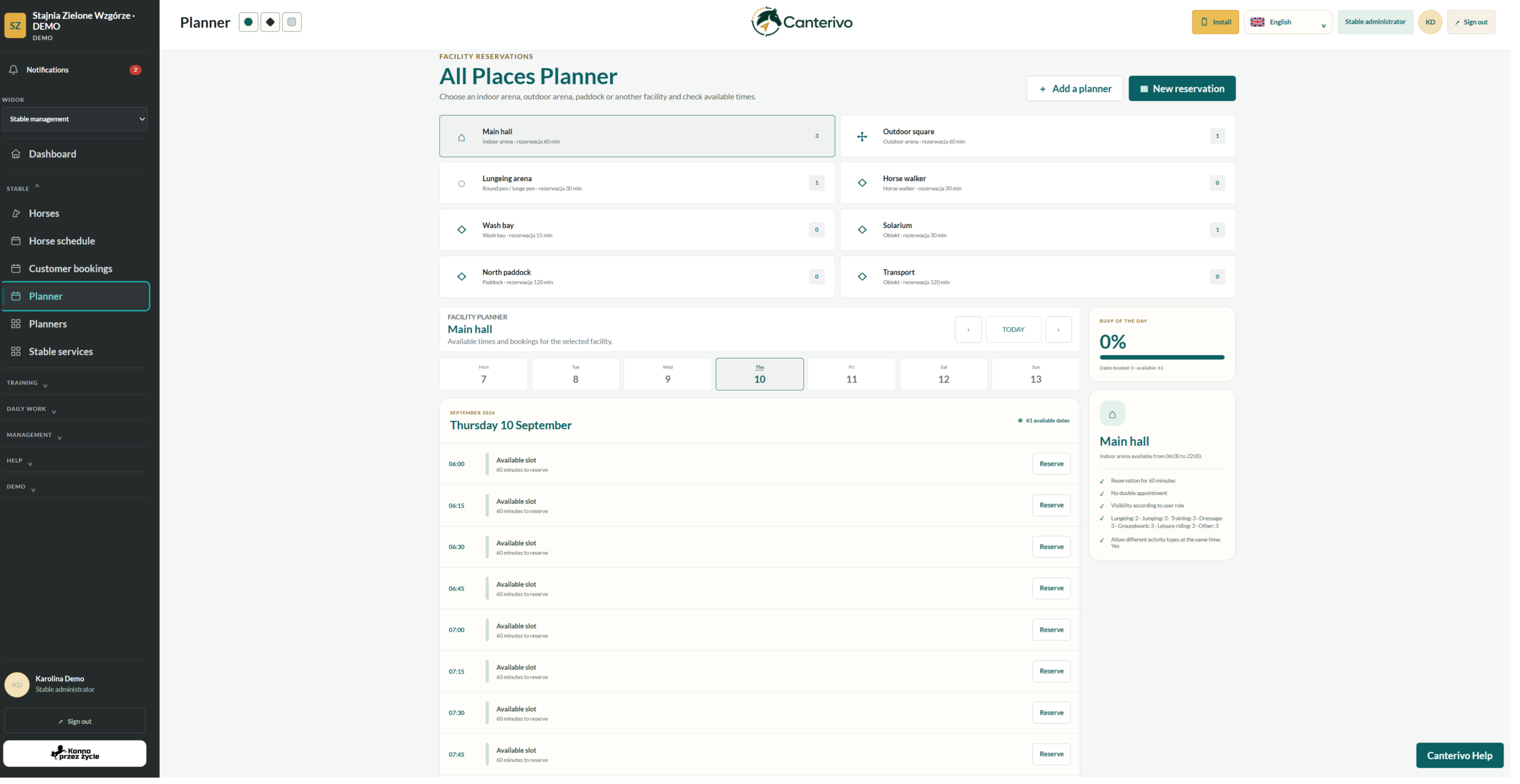
A booking should not require another message
“Is the indoor arena free?”, “Who has booked the outdoor arena at 6 p.m.?” or “Can I book the round pen?” – as more people use the stable, questions like these quickly take up valuable time.
With Canterivo, the availability of each facility is visible in one place, so bookings no longer need to be arranged by phone or message. A shared stable booking system gives users access to the current schedule.
A stable planner tailored to your facilities
Administrators can create planners that reflect the facilities and services available at their stable. A planner can cover indoor and outdoor arenas, paddocks, transport or a custom resource specific to the stable.
From checking availability to a confirmed booking
The planner is designed to make booking simple, not add another process to manage.
Choose a planner
for example, an arena, transport or a custom resource
Check availability
view booked and available time slots
Add a booking
select the time and enter the required information
The schedule updates immediately
other users can see that the time slot has been booked
What a shared stable booking system changes
Fewer questions for the administrator
Users can check availability themselves instead of messaging or calling whenever they need a free time slot.
One source of information
There is no need to compare several calendars, messages or arrangements made verbally.
Better visibility of facility availability
A shared schedule for indoor and outdoor arenas and other resources shows when they are booked throughout the day and where free time slots remain.
Planners tailored to your stable
Not every stable has the same resources. Administrators can create and use only the planners they need.
A stable booking system for different types of equestrian facilities
Livery yard
Indoor and outdoor arenas, paddocks and other facilities used by horse owners.
Riding school
Organisation of arenas and other facilities used for lessons.
Competition yard
Planning training sessions and access to shared facilities.
Private stable
A straightforward shared schedule for a small group of users.
Frequently asked questions about stable bookings and planners
Can I create a planner only for the indoor arena?
Can I create custom planners?
Can users see booked time slots?
Does the planner work on a phone?
Do I have to use the other Canterivo modules?
Explore other areas of the system
Organise bookings at your stable
Try the Canterivo stable booking system free for 60 days, with no card required.
No automatic charge or paid subscription. After the trial, you decide whether to continue.